Support for Palo Alto Networks Strata Cloud Manager is available now. Learn more →
Published:
Introducing FireMon Agentic AI for Network Security Policy Control
FireMon Agentic AI automates firewall policy review, preparing recommendations while security teams keep review and approval control.
by FireMon
An application team needs access to a database. The request sounds straightforward. Before it can move forward, a network security engineer has to find the relevant devices and policies, understand existing access, evaluate possible changes, and prepare a proposal someone else can review. Multiply that work across applications, environments, and firewall vendors, and investigation becomes a substantial part of the team's workload. That work still needs to happen. Incomplete policy context can mean missed dependencies, unnecessary access, or changes that don't meet the business requirement.
FireMon Agentic AI puts agents to work on those investigation and planning steps. Built into FireMon, the capabilities give practitioners more capacity to address policy complexity while keeping consequential decisions with the organisation. Customers can use supplied agents, create their own, or connect external agentic workflows through the FireMon MCP Server.
It's a practical application of FireMon's Network Security Policy Control for the Modern Enterprise, bringing policy evidence and operational tools into the work teams need to complete.
Policy context and tools that perform the work
FireMon's agentic AI framework combines instructions, skills, tools, and permissions. Instructions define what an agent should do. Skills provide supporting knowledge. Tools perform specific operations, from retrieving policy records to computing recommendations and preparing proposed changes.
Consider a policy search. SiQL Expert provides documentation and examples for Security Intelligence Query Language (SiQL). The SiQL tool executes the query. Together, those building blocks give an agent a way to translate a question into a search and explain the information it retrieves.
Agents are also participants in FireMon workflows. Like users, they can receive task assignments and automatically pick up that work. They operate within defined permissions, gathering information and preparing recommendations while engaging a practitioner for review where appropriate. The foundation is the policy information and operational expertise FireMon has developed over 25 years. Agents use that context and the tools available to them to carry out the intermediate work behind a policy decision.
Investigate an access requirement
Take an illustrative request for app-web-01 to reach app-db-01 on TCP port 5432. The first question is what the existing policy says about that access.
The FireMon Intelligent Agent searches and analyses policy data, constructing and running SiQL queries and explaining the findings. A practitioner can ask which rules are relevant to the request without first writing the query or manually assembling separate searches.
The returned records provide evidence for the next decision. The practitioner can inspect relevant rules and their context, then refine the question. Narrowing the investigation to the production environment, for example, focuses the work on the scope that matters to the request. That distinction matters when interpreting the answer. A matching rule is useful evidence, but it doesn't by itself prove end-to-end reachability. The practitioner still needs to understand what the returned information establishes before moving into design. The agent takes on the searching and explanation, leaving the engineer with concrete policy information to evaluate.
Prepare a coordinated change for review
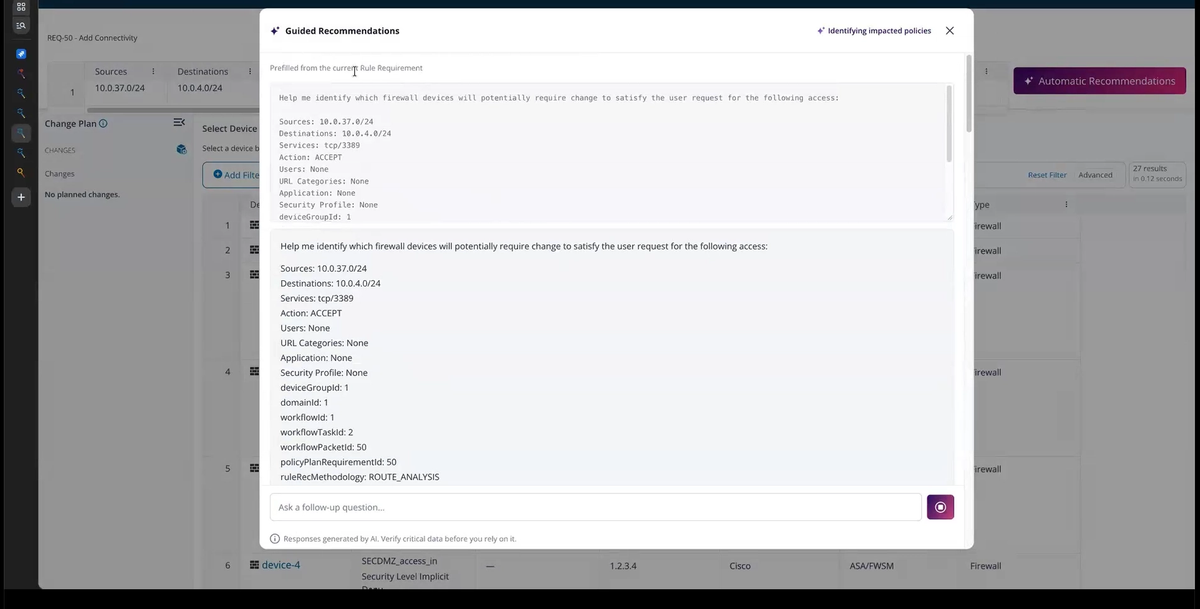
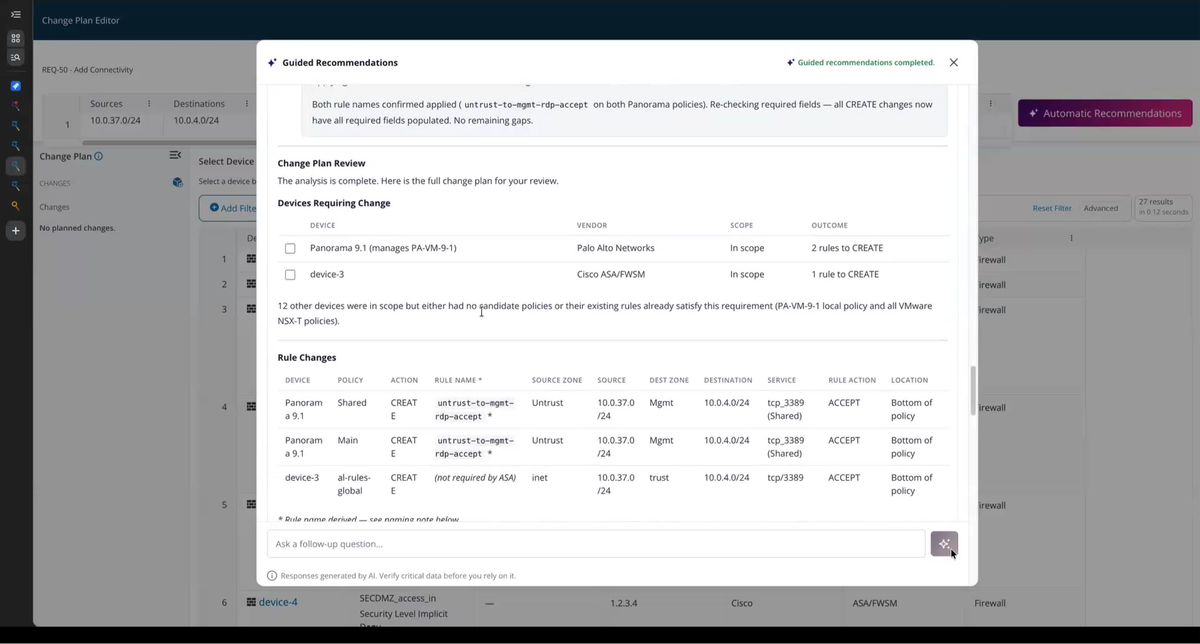
With the requirement understood, Network Designer analyses the source, destination, service, requested action, and device group to produce firewall policy recommendations. For the application-to-database request, those recommendations identify proposed changes for the practitioner to evaluate. Policy Change Designer carries an access request through discovery, recommendations, and preparation of Policy Plan changes. Tools such as Find Rule Starting Devices and Compute Rule Path Recommendations perform specific parts of that investigation and analysis. The agent gathers the results and prepares the proposed work across the relevant device and policy contexts.
There may be several valid ways to satisfy the request. Choosing the right policy can depend on how the organisation manages its environment. Policy Change Designer pauses when the practitioner needs to select among valid alternatives. It also fills required fields such as rule names, reducing manual plan entry while leaving the proposed details available for review.
In this pre-built workflow, nothing is saved until the practitioner reviews and accepts the proposal. They can request revisions or discard it. Acceptance saves the proposed work into Policy Planner for subsequent workflow processing. It does not deploy a change to a firewall, and the workflow requires Policy Planner. These capabilities address related parts of the same operational problem. Teams can use them for the work at hand without assuming an automatic handover between separate agents.
Shape an agent around your team
The supplied agents are starting points. Customers can customise them or create agents with instructions, skills, tools, and permissions suited to their responsibilities. A team might require an agent to list missing inputs and summarise a proposed change before handover. That instruction gives the practitioner a consistent way to see what still needs attention. Running the same request before and after a configuration change makes its effect visible in the output.
Scope is equally important. An agent assigned to a regional team can be limited to the appropriate device group and permitted operations. The Run Agent As setting identifies the execution identity used for its work. Configuration therefore covers both how the agent approaches a task and the authority under which it operates. Agent Plugins and Skill Plugins provide packaged starting points; configured agents and skills apply them to a team's work. Customers can combine the available building blocks around their processes, then assign agents supported workflow tasks. Practitioners retain responsibility for evaluating the results and making the choices that depend on organisational context.
Connect policy evidence to external workflows
The FireMon MCP Server brings selected policy data and supported operations into customer-managed AI applications through Model Context Protocol (MCP). The external application works with its model and invokes tools through an MCP client. FireMon supplies the endpoints, tools, and authorisation. For an incident investigation, an external workflow can combine alert information with policy records retrieved through Execute SiQL Search. This brings network security evidence into the investigation without requiring someone to gather and transfer each record manually. The results inform the analysis; they don't establish the full scope of an incident on their own.
Our starting tool catalogue at launch contains 16 tools spanning search, discovery, recommendations, change preparation, and authorised saving. An access workflow can convert selected recommendations into staged Policy Plan changes. With the required permissions, Save Policy Plan Change persists that work into Policy Planner. The catalogue exposes no direct firewall-deployment operation. We’ll be adding new tools on a regular basis, expanding FireMon’s agentic capabilities over time.
Access follows the FireMon identity making the request. Each Personal Access Token belongs to a user, and MCP uses the same underlying permission checks as FireMon REST APIs, including applicable role and device-group restrictions. Tokens don't carry independent permission scopes. A dedicated account without change-writing permissions can restrict an external workflow to authorised analysis. Customers should define permissions and applicable workflow controls for the intended use. The pre-built Policy Change Designer's review-before-saving sequence isn't a universal approval requirement for every MCP operation.
See what agentic policy work looks like for your team
FireMon Agentic AI and FireMon MCP Server are available with FireMon's October Security Manager Platform release. AI is optional and off by default. Customers can choose a supported model, including their own approved model environment, and remain responsible for associated model costs.
The practical opportunity is more capacity for policy work. Agents gather information, investigate alternatives, and prepare changes while practitioners direct the work and make the decisions that require their judgement. Bring an access request or policy investigation your team handles regularly. See how FireMon's agentic capabilities can work for you, from gathering policy context to preparing changes for review.
Get a Demo to see how FireMon Agentic AI can ease the burden of policy management in your environment.